
Build 407.0.1 Update
407.0.0 Released Aug 10, 2026, 407.0.1 Hotfix Released Aug 24, 2026
The following information is for our latest program update.
Programming Issues Resolved - Build 407
Training Company Build 407.0.1
The Training Company provides a safe environment to test the features of a build on your own data without affecting your live company. You can preview the version ahead of your main company update, or you can use the training company as an ongoing resource for a safe testing environment. You must uninstall any old version of the Training company before installing the latest version.
Program Update Installation Notice Build 407
This program update may take longer than average to complete because it includes significant database changes.
After the update is completed, you must perform a full Backup and Restore using the DBA Backup Manager (see below). This step is required to rebuild and optimize the database after the update.
Plan accordingly and allow sufficient time to complete both the program update and the required Backup and Restore process. For larger databases, the combined update and Backup/Restore process may take several hours.
IMPORTANT: Backup and Restore Required After Update
If you are applying this update to an existing database, you must perform a Backup and Restore using the DBA Backup Manager immediately after the update is completed. You should also perform the Backup and Restore on the Training Company after install.
The Backup and Restore process is required to rebuild and optimize the database after the update. Once completed, the overall database size is expected to be reduced by approximately 20–35%.
DBA Backup Manager - Backup and Restore
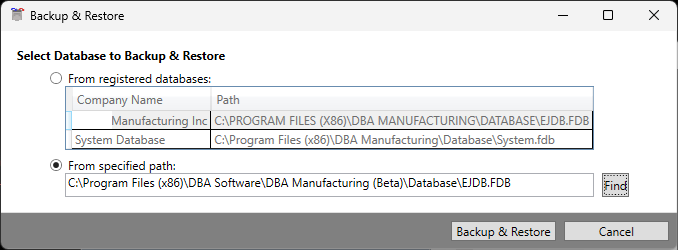
Main Company - use “From Registered Database” Option
Training Company - use “From specified path” Option to point to the location of your Training (Beta) database.